
Retrola: Old Cam Vintage Film


About this app
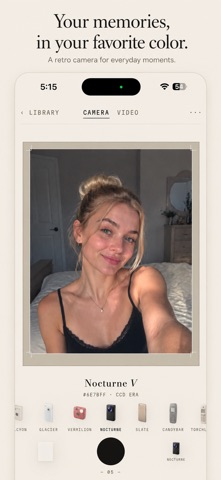
Retrola is not a filter app. It is a shelf of cameras, and you shoot with them.
Pick a camera from the rail and the viewfinder becomes that camera — live, before you take the shot. Switch to another and the room changes decade.
THE COLLECTION — 31 cameras, seven eras
- CCD Era — the warm golden compacts of the early 2000s
- Pocket Phone — two-megapixel cameraphones, oversharpened and over-compressed
- Press & Print — CMYK halftone dots, ink bleed, newsprint paper
- Home Micro — the fixed colour palettes of early home computers
- Pixel Blocks — clean mosaic
- Film Stock — expired colour, milky matte, silver black and white, cine halation, instant print, toy fisheye
- Motion — a slipped film gate, camcorder tape with chroma fringing
Six cameras are free forever, one from every engine.
How It Works
Each camera is a modelled engine, not a colour preset. Film response curves, dye-layer crosstalk, halation bloom, grain, halftone screens, palette quantisation and real compression loss — built from how the equipment actually behaved.
- The live viewfinder shows the finished look before you press the shutter
- A strength dial on every camera, from a whisper to full force
- Seven finishes on top: Warm, Cold, Sepia, Faded, Punch, Bleach, Mono
- Video too — record now, change the camera later
- Your negative is always kept, so any photo can be re-developed under any camera, any time
- No watermark, ever — including on the free cameras
- Everything runs on your device. No account, no tracking, nothing uploaded.
Retrola Pro
Unlocks all 31 cameras.
Payment is charged to your Apple Account at confirmation of purchase. A subscription renews automatically unless auto-renew is turned off at least 24 hours before the end of the current period; your account is charged for renewal within 24 hours of the end of the current period. Manage or cancel in Settings › Apple Account › Subscriptions.
Terms of Use (EULA): https://www.apple.com/legal/internet-services/itunes/dev/stdeula/
Privacy Policy: https://sites.google.com/view/anima-chat/oldcampolicy


